

What the Agent Sees
The agent’s context is constructed from four sources: Conversation. The messages exchanged between the user and the agent. Skills. The SKILL.md files registered by the application, which provide domain-specific instructions and context. Tool schemas. The names, descriptions, and input schemas of available tools—but not their implementations or internal state. Tool outputs. The results returned when tools are invoked.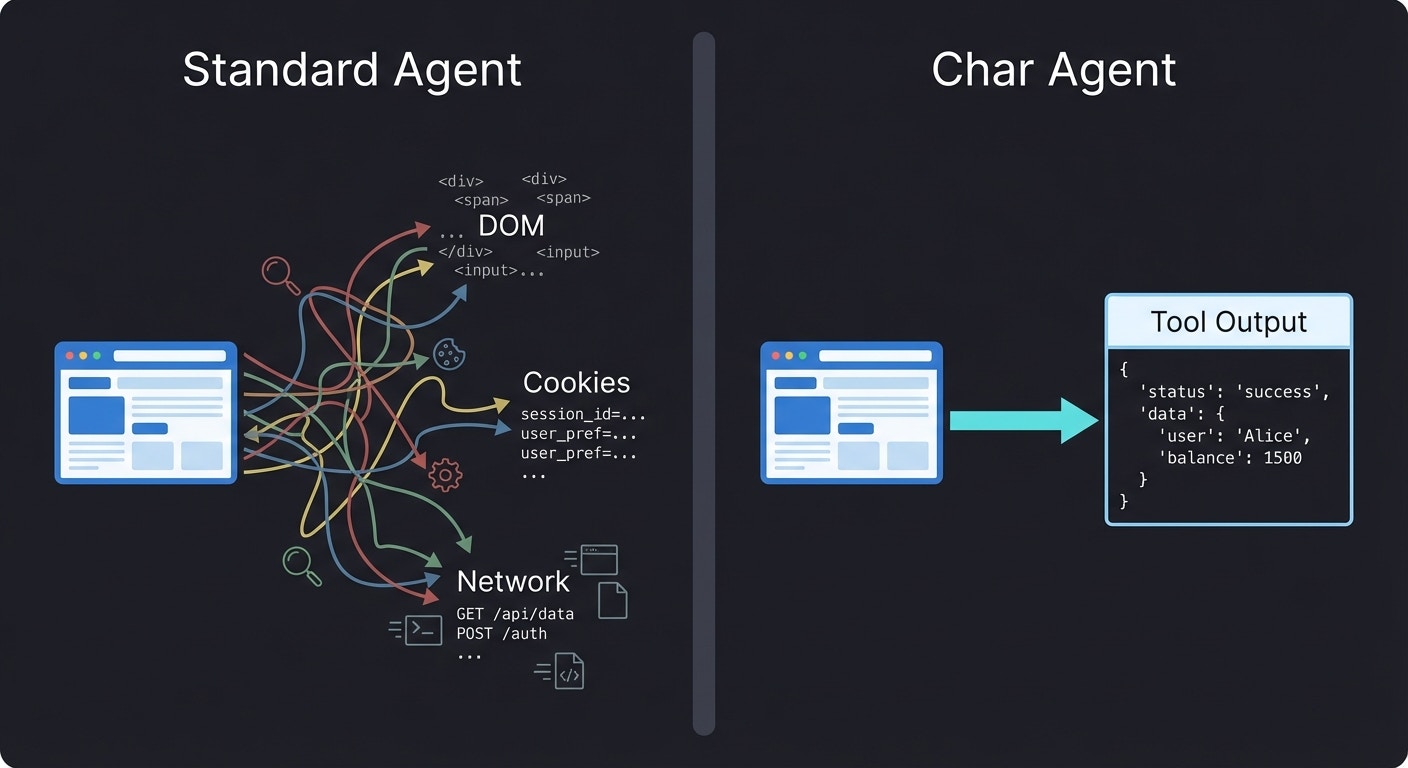
What This Prevents
Consider what happens when a browser automation agent visits a malicious page:- The page contains hidden instructions in its content
- The agent reads the page as part of its task
- The hidden instructions manipulate the agent’s behavior
- The agent performs actions the user didn’t intend
Explicit vs Implicit Context
The difference between Char and browser automation agents is the difference between explicit and implicit context. Implicit context is ambient state the agent can access without anyone deciding to expose it. A browser agent can read any element on any page it visits. The developer didn’t choose to expose that data—it’s just there. Explicit context requires a deliberate decision. For Char, every piece of information the agent sees was placed there intentionally—by the user typing a message, by the developer registering a skill, or by a tool returning output. This explicitness has consequences:- Developers can reason about what the agent knows
- Security teams can audit the boundaries
- Users can understand what they’re sharing
The Trust Boundary
Even explicit context can contain problems. A tool might return user-generated content that includes prompt injection attempts. A third-party MCP might return responses designed to manipulate the agent. Char addresses this through trust boundaries rather than content inspection: Internal tools—those provided by the embedding application or internal MCP servers—are treated as trusted. The enterprise controls this code and vouches for its behavior. Inspecting internal content would be like distrusting your own database. External tools—third-party MCP servers—receive additional scrutiny. The assumption is that external content is potentially hostile. The distinction follows how enterprises already think about trust. Internal systems are assumed safe until proven otherwise. External systems are assumed dangerous until proven safe.Content guardrails (PII detection, prompt injection filtering) are available on the Enterprise plan. The base protection relies on the explicit context boundary itself—if a tool doesn’t expose malicious content, the agent never sees it. See Trust Boundaries for how internal and external tools are distinguished.
Behavioral vs Architectural Defense
Security researchers distinguish between behavioral and architectural defenses: Behavioral defenses try to prevent bad outcomes by instructing the agent not to do bad things. Prompt engineering, output filtering, and content moderation fall into this category. These defenses can be effective but are inherently probabilistic—a sufficiently clever attack might bypass them. Architectural defenses make bad outcomes structurally impossible. If the agent can’t see the malicious content, it can’t be manipulated by it—regardless of how clever the attack is. Char relies primarily on architectural defenses. Context isolation, identity scoping, and hub-mediated execution are all structural constraints that work regardless of what the model is prompted to do. Guardrails provide an additional behavioral layer for content that must flow through the system, but they’re not the primary line of defense.Further Reading
Security Architecture
The overall security design and its rationale
Trust Boundaries
How internal and external MCPs are treated differently
Tool Hub
How the Hub mediates all tool invocations
Security Reference
Technical specifications and configuration